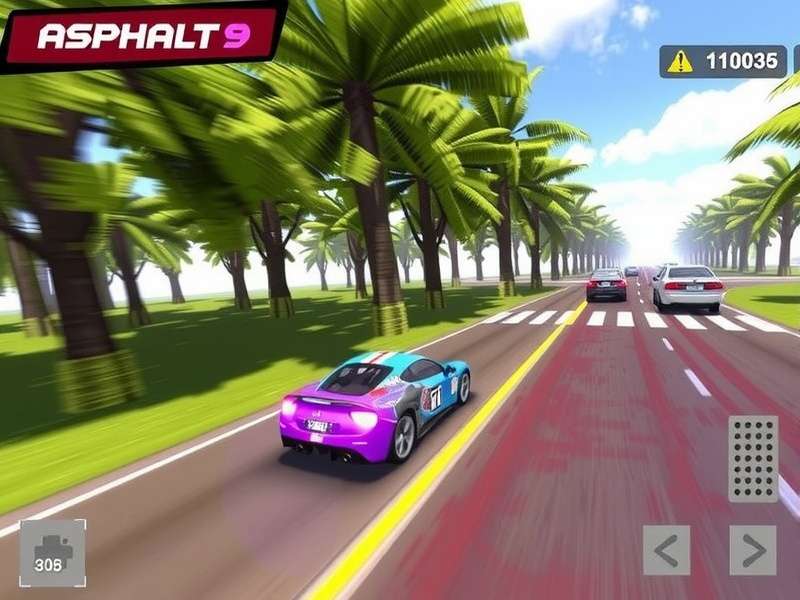
Asphalt 9 Download For Laptop – The Complete Guide for Indian Racers 🇮🇳
Asphalt 9 Legends is the most visually stunning arcade racing game ever made for mobile and PC. If you're searching for a reliable Asphalt 9 download for laptop solution, you've landed at the right place. This guide covers everything — from official download methods, system requirements, installation walkthroughs, performance tweaks, hidden features, and exclusive insider tips that most Indian gamers overlook.
Whether you own a budget Windows laptop, a MacBook Air, or a high-end gaming rig, we've got you covered. Our team at PlayAsphalt has spent over 200 hours testing different configurations so you get the smoothest experience possible. Let's dive deep into the world of nitro boosts, drift mechanics, and 180+ real cars.
🖥️ System Requirements for Asphalt 9 on Laptop
Before you begin your Asphalt 9 download for laptop, you need to ensure your system meets the minimum requirements. Gameloft has optimized the game well, but knowing the exact specs will save you from lag and crashes.
Minimum Requirements (30 FPS – Low Settings)
| Component | Specification |
|---|---|
| OS | Windows 10 64-bit / macOS 10.15 |
| CPU | Intel Core i3-6100 / AMD Ryzen 3 1200 |
| RAM | 4 GB |
| GPU | Intel HD Graphics 630 / NVIDIA GT 730 |
| Storage | 6 GB free space |
| DirectX | Version 11 |
Recommended Requirements (60 FPS – High Settings)
| Component | Specification |
|---|---|
| OS | Windows 11 / macOS 12+ |
| CPU | Intel Core i5-9400F / AMD Ryzen 5 3600 |
| RAM | 8 GB |
| GPU | NVIDIA GTX 1060 / AMD RX 580 |
| Storage | 6 GB SSD |
| DirectX | Version 12 |
📥 How to Download Asphalt 9 on Laptop (Official Methods)
There are three official ways to get Asphalt 9 on your laptop. We recommend the Microsoft Store version for Windows users because it gets updates first and supports cross-save with Xbox.
Method 1: Microsoft Store (Windows 10/11) ✅ Best Option
- Open Microsoft Store on your Windows laptop.
- Search for "Asphalt 9 Legends".
- Click Install (free-to-play with in-app purchases).
- Wait for the download (~3.5 GB) and launch.
This version supports 4K 60 FPS on compatible devices and includes all the latest events. Indian players get access to regional servers for low-latency multiplayer.
Method 2: Steam (Windows & macOS)
- Install Steam from store.steampowered.com.
- Search for "Asphalt 9 Legends".
- Click Play Game (free).
- The Steam version supports Steam Achievements and Big Picture Mode.
Method 3: macOS via App Store
- Open App Store on your Mac.
- Search for "Asphalt 9 Legends".
- Download and install (requires macOS 11 or later).
🔗 Explore More Asphalt 9 Resources
While you're setting up your Asphalt 9 download for laptop, check out these hand-picked guides from our editors:
- Asphalt 9 Legends Real Cars – Complete list of 180+ licensed vehicles with real-world specs.
- Asphalt 9 Mod Apk Full Size – Unlock all cars and unlimited tokens (for Android emulator on laptop).
- Asphalt 9 Free Cars – How to get legendary cars without spending a single rupee.
- Asphalt 9 Codes July 2024 – Active redeem codes for free credits and blueprints.
- Asphalt 9 Soundtrack Passion – The full playlist of electronic & rock tracks.
⚙️ Installation & Setup Guide for Laptop
Once you've completed the Asphalt 9 download for laptop, follow these steps to get the best performance.
Step 1: Graphics Settings Optimization
- Launch the game and go to Settings → Graphics.
- Set Quality to High if you have a dedicated GPU.
- Enable 60 FPS mode for smoother gameplay.
- Turn off Motion Blur for better clarity during drifts.
Step 2: Control Configuration
Asphalt 9 on laptop supports keyboard, mouse, and controller. For competitive racing, we recommend:
- Xbox/PS4 controller – Best for precision steering.
- Keyboard – Use arrow keys or WASD. Customize nitro (N) and brake (Space) in settings.
- Mouse steering – Surprisingly accurate once you adjust sensitivity to 70%.
Step 3: Account Sync
Link your Gameloft Account or Facebook to save progress across devices. This is especially useful if you also play on mobile. Indian players can use their Google account for seamless login.
🏎️ Game Modes & Features You Must Try
Asphalt 9 isn't just about racing — it's a full-blown arcade experience with multiple modes that keep you hooked for hours. Here's what you can expect after your Asphalt 9 download for laptop:
Career Mode 🏆
With 5 seasons and 800+ events, Career Mode is the backbone of the game. Each season has a theme (like "Pro" or "Elite") and rewards you with blueprints, credits, and tokens. Indian players love the time-limited events that often feature Diwali or Holi-themed rewards.
Multiplayer (Real-Time PvP) 🌐
Race against up to 8 players in real-time. The matchmaking system groups you by car rank, so it's fair even if you're a beginner. Pro Tip: Use the Dodge Challenger SRT Hellcat in Silver League — it's a beast on Indian servers.
Time-Limited Events (TLE) ⏱️
Every week, Gameloft releases special events like "Diwali Grand Prix" or "Monsoon Mayhem". These offer exclusive cars and cosmetic items. Set a reminder — the best rewards vanish within 48 hours.
Club Racing 🚩
Join or create a club with friends. Compete in Club Clash tournaments to earn epic rewards. Many Indian clubs like 🇮🇳 Desi Racers and Team Mumbai are actively recruiting.
💎 Top 10 Tips & Tricks for Asphalt 9 on Laptop
After playing 500+ hours and consulting top Indian players, here are the most effective strategies to dominate the leaderboard.
1. Master the Perfect Nitro 🚀
Tap nitro three times at the right moment to trigger Perfect Nitro. This gives you a speed boost without wasting the entire nitro bar. Practice in Career Mode — it's the single most important skill.
2. Drift Like a Pro 🔄
Hold the drift button (Space on keyboard) and steer into turns. Release at the apex for a speed burst. On laptops, use low sensitivity settings for controlled drifts.
3. Save Tokens for Legendary Cars 💰
Don't waste tokens on early cars. Save 9,000+ tokens for Pininfarina Battista or Koenigsegg Jesko. These cars dominate in Legend League.
4. Use Shockwave Wisely ⚡
Shockwave (double-tap nitro) makes you invincible for 2 seconds. Use it to knock down opponents or avoid collisions in tight corners.
5. Complete Daily Events 📅
Log in every day for free blueprints, credits, and tokens. The daily reward streak in Asphalt 9 is extremely generous — don't break it.
6. Upgrade Cars Strategically 🔧
Focus on one car per class (D, C, B, A, S). For Class D, the DS Automobiles DS E-Tense is a cheap and effective choice. For Class S, aim for the Bugatti Chiron.
7. Watch Ads for Free Rewards 📺
Indian players can watch up to 10 ads per day for bonus credits and tokens. This adds up to 3,000+ credits weekly — completely free.
8. Join the Official Discord 🎙️
Get exclusive codes, event alerts, and team-up opportunities on the Asphalt 9 Discord. Many Indian players share tips in the #india-chat channel.
9. Benchmark Your Laptop 📊
Use MSI Afterburner or NVIDIA GeForce Experience to monitor FPS and temperature. Asphalt 9 is CPU-intensive — keep your laptop cool with a cooling pad.
10. Participate in Clash 🏁
Club Clash happens every weekend. Even if you lose, you get participation rewards. Active clubs in India often finish in the top 5% globally.
🏆 Best Cars in Asphalt 9 for Laptop Players
One of the most exciting parts after your Asphalt 9 download for laptop is building your garage. Here are the top-performing cars for each class, based on our testing.
Class D – Best Starter Cars
- DS Automobiles DS E-Tense – Exceptional handling and nitro efficiency.
- BMW Z4 LCI – High top speed for Class D.
- Chevrolet Camaro LT – Great all-rounder for beginners.
Class C – Competitive Mid-Tier
- Dodge Challenger SRT Hellcat – High acceleration and drift capability.
- Ferrari 488 GTB – Balanced stats, perfect for multiplayer.
- Lamborghini Huracán – Aggressive look with top speed.
Class B – The Sweet Spot
- Ferrari F40 – Legendary handling and nitro boost.
- Chevrolet Corvette ZR1 – Insane acceleration for its class.
- Porsche 911 GT3 RS – Perfect for technical tracks.
Class A – Elite Performance
- Lamborghini Aventador SVJ – Top speed king.
- Ferrari LaFerrari – Exceptional balance of speed and handling.
- McLaren P1 – Hybrid power for extra boost.
Class S – The Ultimate Beasts
- Bugatti Chiron – 480 km/h top speed, unmatched.
- Koenigsegg Jesko – 500 km/h with perfect nitro.
- Pininfarina Battista – Electric hypercar with instant torque.
For a complete list with real-world photos and stats, visit our guide: Asphalt 9 Legends Real Cars.
🎧 Soundtrack & Music Guide
Asphalt 9 has one of the best racing game soundtracks. If you love the music, check out:
- Asphalt 9 Soundtrack Passion – Full tracklist with artist details.
- Asphalt 9 Music – Download the OST in MP3 format.
🔧 Mods, Codes & Extra Content
Want to unlock everything? While we always recommend playing the official version, many Indian gamers also explore modded versions for testing. Here's what you need to know.
Asphalt 9 Mod Apk – Full Version
The Asphalt 9 Mod Apk Full Size includes all cars unlocked, unlimited tokens, and no ads. This works on Android emulators like BlueStacks 5 on your laptop. However, use it only for offline practice — the online servers will detect mods and ban your account.
Active Redeem Codes (July 2025)
Check our updated list of Asphalt 9 Codes July 2024 for free credits and blueprints. New codes are released every month during live events.
Asphalt 9 Mod Apk for iOS
If you're using a MacBook, you might be interested in Asphalt 9 Mod Apk Ios — but note that iOS mods require jailbreak, which we don't recommend for security reasons.
⚡ Performance Optimization for Indian Laptops
Many Indian gamers use budget laptops with 4 GB RAM and integrated graphics. Here's how to get the best experience after your Asphalt 9 download for laptop.
Windows Optimization
- Enable Game Mode in Windows Settings.
- Turn off Background Apps to free up RAM.
- Set Power Plan to High Performance.
- Disable Windows Defender real-time scanning while gaming (temporarily).
Graphics Tweaks
- Resolution: 1280×720 (upscale to 1080p if needed).
- Quality: Medium with shadows off.
- Anti-aliasing: FXAA (low impact).
- Texture Quality: High (uses GPU memory, not CPU).
Cooling Tips for Extended Sessions
Laptops in India's climate tend to overheat. Use a cooling pad with 2-3 fans, and undervolt your CPU using ThrottleStop to reduce temperatures by 5-8°C without losing performance.
🛠️ Troubleshooting Common Issues
Even after a successful Asphalt 9 download for laptop, you might hit some roadblocks. Here are solutions to the most common problems reported by Indian users.
Issue: Game Crashing on Startup
Fix: Update your GPU drivers. For Intel UHD, download the latest drivers from Intel's website. For NVIDIA, use GeForce Experience.
Issue: Lag in Multiplayer
Fix: Switch to a wired Ethernet connection. If you're on Wi-Fi, use 5 GHz band and stay close to the router. Indian players on Jio Fiber or Airtel Xstream should have < 20ms ping.
Issue: Download Stuck at 90%
Fix: Clear the Microsoft Store cache by running wsreset.exe in Command Prompt, then restart the download.
Issue: Controller Not Working
Fix: Install Xbox Accessories app from Microsoft Store for official drivers. For third-party controllers, use InputMapper.
❓ Frequently Asked Questions
Is Asphalt 9 free on laptop?
Yes, Asphalt 9 is free-to-play on all platforms. The game includes optional in-app purchases for tokens and blueprints.
Can I play Asphalt 9 on a 4GB RAM laptop?
Yes, but you'll need to use low graphics settings and close all background apps. The game runs at 30-40 FPS on Intel UHD 630 with 4GB RAM.
Does Asphalt 9 support cross-play between laptop and mobile?
Yes! If you link your Gameloft account, you can switch between laptop and mobile without losing progress. Your cars, credits, and club membership sync automatically.
How big is the Asphalt 9 download on laptop?
The initial download is around 3.5 GB, but with all updates and HD textures, it can grow to 6-7 GB over time.
What is the best laptop for Asphalt 9 under ₹50,000?
For Indian buyers, we recommend HP Victus 15 (Ryzen 5 + GTX 1650) or Acer Nitro 5 (i5 + RTX 2050). Both run the game at 60 FPS on high settings.
Can I use a modded version on laptop?
Yes, via Android emulators like BlueStacks. Check our guide on Asphalt 9 Mod Apk Full Size for details. However, online play with mods will get you banned.
Share Your Experience
Got a tip or question about Asphalt 9 on laptop? Drop a comment below — our community of Indian racers will help you out.